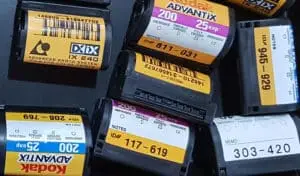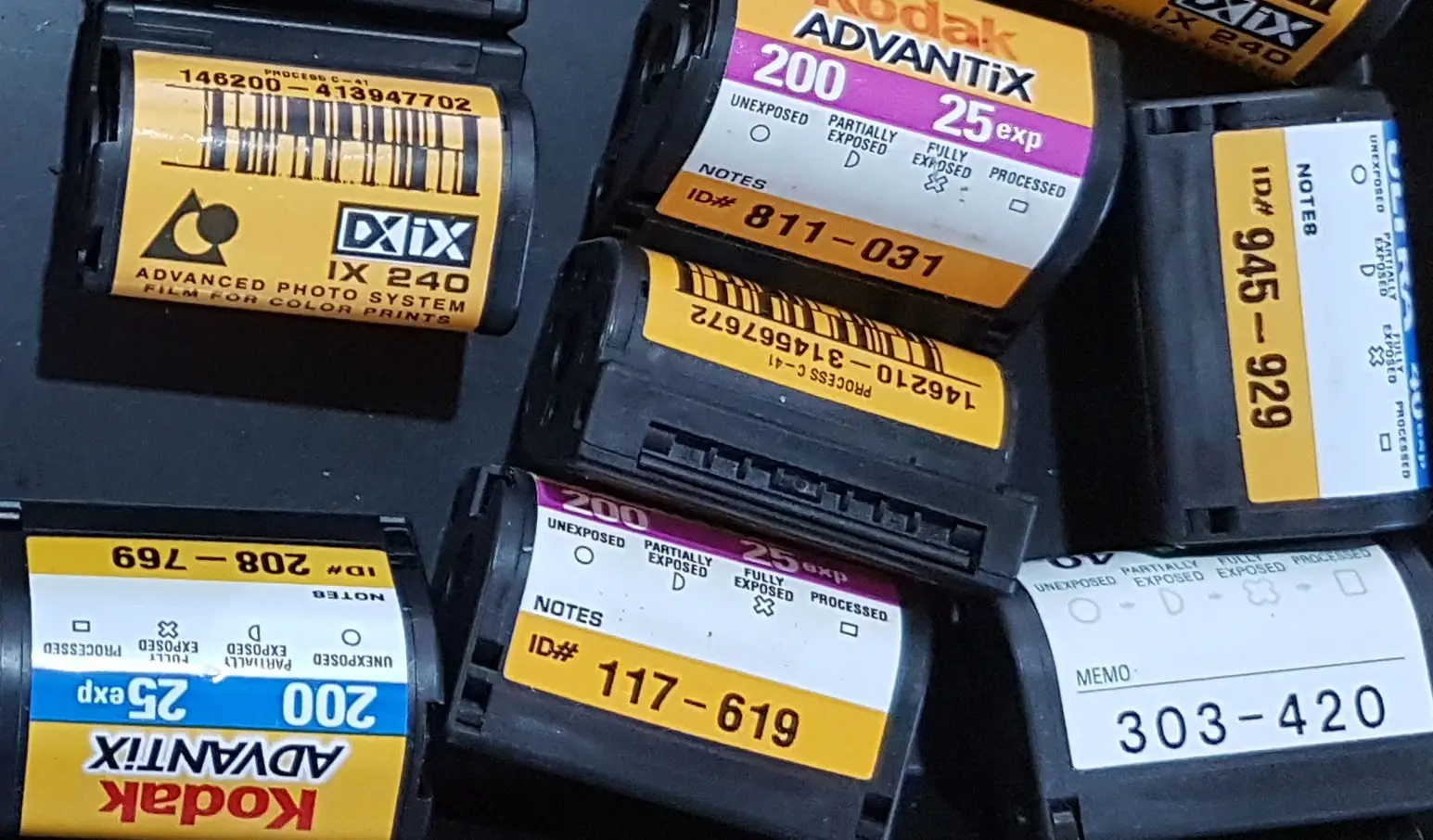

APS film is a discontinued photographic film format introduced in the 1990s and commonly found inside a small plastic cartridge rather than as loose strips of negatives. If you have old developed APS cartridges, the simplest way to view the photographs today is usually to have the negatives professionally scanned and converted into digital image files.
A quick guide:
| Question | APS Film |
|---|---|
| Full name | Advanced Photo System |
| Film format | IX240 |
| Negative size | Smaller than 35mm |
| Storage | Cartridge |
| Common name | APS film |
| Image choices | Classic, High Definition and Panoramic |
| Can old negatives be scanned? | Yes |
| Best way to view today | Digitise the negatives |
What Exactly Is APS Film?
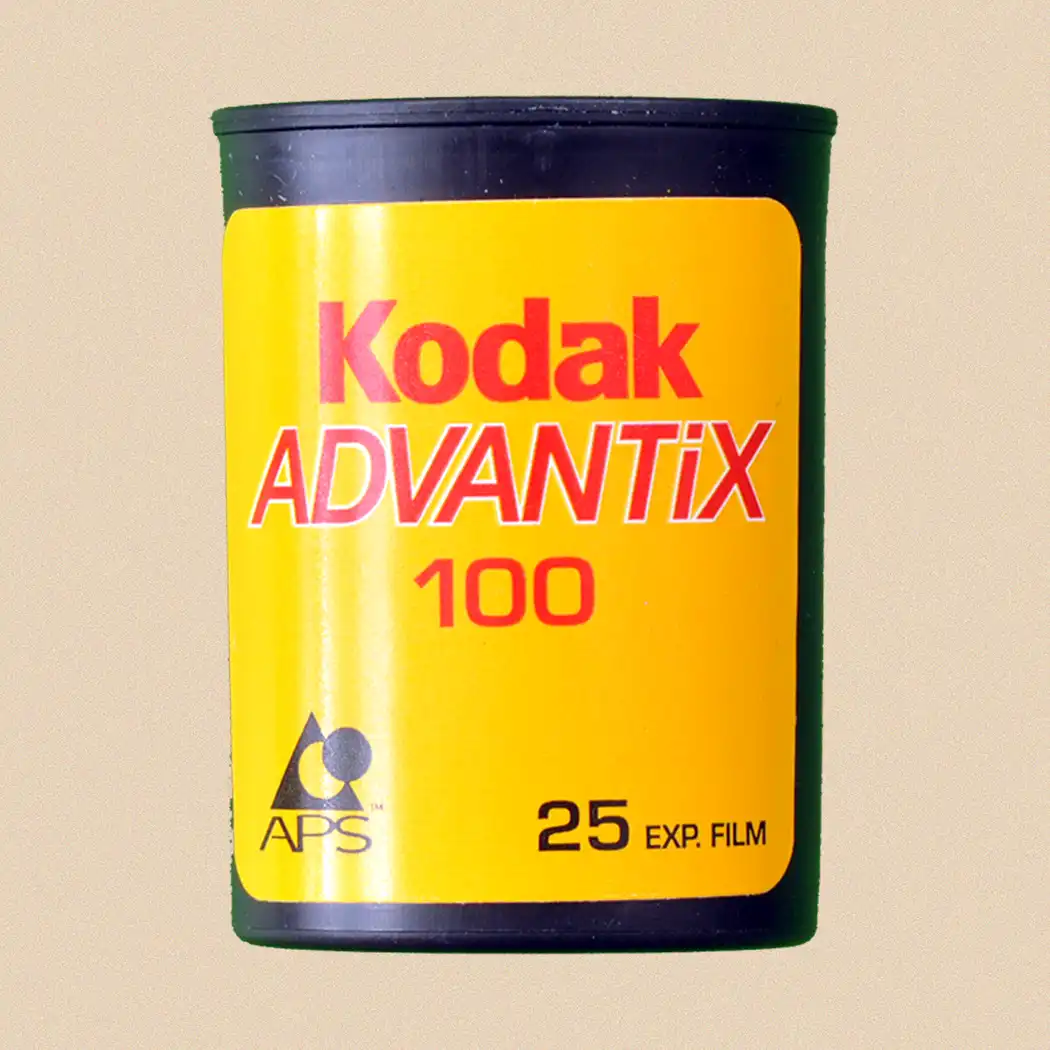
APS stands for Advanced Photo System, a photographic system designed to make film photography more convenient for everyday users.
Unlike conventional 35mm film, APS film stays inside a compact cartridge. This made loading and handling considerably simpler because photographers didn’t normally have to touch or thread the film.
The format is also known as IX240.
For many people, APS arrived during the final major era of consumer film photography before digital cameras became dominant. Millions of family photographs from holidays, birthdays, weddings and everyday life were therefore captured using APS cameras.
Today, the cameras and cartridges can be confusing because the negatives aren’t immediately visible. You may find a small APS cartridge in a drawer and wonder whether it contains photographs at all.
If the film has already been processed, the cartridge can still contain the negatives needed to recover the pictures digitally.
How Can I Recognise an APS Film Cartridge?
APS cartridges look quite different from conventional 35mm film canisters.
They’re small, enclosed plastic cartridges specifically designed to protect the film inside. Unlike a processed roll of conventional 35mm film, you won’t normally see a long strip of negatives protruding from the cartridge.
That enclosed design was one of the system’s attractions.
If you’re sorting an inherited photographic collection, look for:
- small plastic film cartridges;
- APS or Advanced Photo System markings;
- IX240 references;
- exposure information such as 15, 25 or 40 exposures;
- cartridges stored alongside APS prints or index prints.
Don’t prise open a cartridge merely to check whether there’s film inside. If the negatives contain irreplaceable family photographs, unnecessary handling creates risk without helping you view them.
Why Are APS Negatives Kept Inside the Cartridge?
APS was designed around convenient film handling.
With traditional 35mm photography, processed negatives were commonly returned as strips stored in sleeves. APS took a different approach: the developed film could be returned to and stored within its original cartridge.
That offered practical protection against fingerprints, dust and handling.
The downside becomes obvious decades later. You can’t simply hold an APS cartridge towards a window and look at the individual negative frames.
Access requires compatible equipment capable of extracting or advancing the film correctly.
That’s one reason professional digitisation can be particularly useful with APS. The aim isn’t simply to scan a negative; the film first needs to be handled appropriately.
Is APS the Same as 35mm Film?
No. APS and 35mm are different photographic film formats.
Although both were popular consumer photography systems, APS uses smaller film and a different cartridge arrangement.
| Feature | APS | 35mm |
|---|---|---|
| Film designation | IX240 | 135 |
| Cartridge | Enclosed APS cartridge | Metal/plastic cassette |
| Negative size | Smaller | Larger |
| Processed film | Commonly returned inside cartridge | Commonly returned in strips |
| Loading | Drop-in cartridge system | Film leader loaded into camera |
| Format selection | C, H and P options | Normally standard frame format |
| Modern viewing | Usually scanning | Scanning or direct negative inspection |
If you find both types together, APS is generally easy to distinguish because of its distinctive cartridge.
The smaller negative area also matters when digitising. Good scanning and careful handling become particularly important when you’re trying to extract as much useful detail as possible from a relatively small original.
What Do C, H and P Mean on APS Photos?
One of APS’s distinctive features was the ability to choose different print formats.
These were commonly identified as:
- C – Classic
- H – High Definition
- P – Panoramic
This can cause confusion when old photographs are scanned.
The important point is that these settings affected how the photograph was intended to be printed rather than magically creating three fundamentally different types of film.
A panoramic APS print, for example, may represent a cropped presentation of the image rather than a physically much wider negative.
When digitising APS film, retaining the available image information can therefore be useful. You can always crop a digital copy later to recreate the intended print proportions.
What Is an APS Index Print?
If you’ve found APS photographs, you may also discover an index print.
This is a sheet displaying small thumbnail versions of the photographs from a roll. It acted as a convenient visual reference, allowing the photographer to see which pictures were on the cartridge without examining the negatives.
Keep these sheets.
They can be extremely useful when organising a digitisation project because they may help you:
- identify what’s on each cartridge;
- recognise missing images;
- match prints with negatives;
- establish the original sequence;
- identify dates or events;
- decide which cartridges should be prioritised.
However, don’t scan an index print instead of the original negatives if image quality matters. The index sheet is a reference copy; the film itself is the photographic source.
How Can I View Old APS Negatives?
For most people today, the practical solution is to scan the APS negatives and create digital files.
Once converted, you can view the photographs on a:
- computer;
- tablet;
- smartphone;
- television;
- digital photo frame;
- cloud photo library.
You can also make new photographic prints from suitable digital files.
This removes the dependence on ageing APS-specific equipment and makes the images much easier to organise and share.
For an important collection, retain the original cartridges after scanning rather than disposing of them.
Can I Scan APS Film Myself?
Potentially, but APS presents more complications than loose 35mm negatives.
A scanner needs to capture the small film frames at sufficient quality, but first you need safe access to the film.
Some older scanners and accessories were designed specifically for APS. However, compatible equipment is much less commonplace now, and buying ageing hardware for a one-off collection may not be particularly economical.
DIY scanning also involves decisions about:
- resolution;
- colour correction;
- dust removal;
- cropping;
- orientation;
- file format;
- file naming;
- backup.
If you already have suitable photographic scanning equipment and understand how to handle APS cartridges, a DIY project may be perfectly reasonable.
For a few irreplaceable cartridges with no suitable equipment available, professional scanning is generally much simpler.
Can You Look at APS Negatives Without a Scanner?
Not conveniently while they remain inside the cartridge.
This is one of the major differences between APS and conventional loose negative strips.
With a 35mm negative, you can hold the strip towards a suitable light source and at least see the miniature image. APS film is normally enclosed, so you don’t have that immediate visual access.
Once appropriately extracted, the individual negative frames can be viewed with magnification and transmitted light, but they’re small.
If your actual goal is to find out what’s on the film, scanning is much more useful. It gives you a positive, enlarged image rather than asking you to interpret a tiny colour negative.
What If I Have APS Prints but Can’t Find the Negatives?
Keep the prints. They can still be digitised.
Scanning an original negative will generally provide a better starting source than scanning a small photographic print, but a surviving print may be the only copy available.
Before assuming the cartridge has disappeared, check:
- old camera bags;
- photographic envelopes;
- drawers containing prints;
- boxes of negatives;
- loft storage;
- cupboards containing old cameras;
- packets from photographic processing shops.
APS cartridges can be easy to overlook because someone unfamiliar with the format may not recognise them as containing processed negatives.
If the negatives genuinely can’t be found, a good-quality scan of the original print can still preserve the photograph digitally.
Can Old APS Film Still Be Developed?
This requires an important distinction between processed APS negatives and undeveloped APS film.
If the film was developed years ago and returned to its cartridge, the negative images already exist and can be scanned.
If you have an old cartridge that was exposed in a camera but never developed, it needs chemical processing before any images can be viewed.
This is more specialised because APS has been discontinued and mainstream processing infrastructure has largely disappeared. Availability of processing for old, exposed APS film should therefore be checked with an appropriate specialist rather than assuming a standard photo laboratory can handle it.
Age also matters. With film left undeveloped for many years, image quality can’t be guaranteed.
Don’t open an undeveloped cartridge to inspect it. Exposing undeveloped photographic film to light can damage the latent images you’re trying to recover.
Does APS Film Deteriorate With Age?
Like other photographic film materials, APS negatives aren’t immune to deterioration.
Photographic collections can be affected by poor environmental conditions, contamination, physical damage and inappropriate handling. The National Science and Media Museum notes the importance of cool, dry archival storage for fragile photographic materials in its collections. National Science and Media Museum blog
For a home collection, sensible precautions include:
- keeping cartridges dry;
- avoiding hot lofts and damp garages;
- keeping them away from direct sunlight;
- avoiding unnecessary opening or dismantling;
- protecting them from dust and contamination;
- keeping cartridges clearly labelled;
- creating digital copies of important images.
A cartridge provides physical protection, but it doesn’t make the film indestructible.
If your APS photographs are important family records, digitising them also reduces the need to repeatedly handle the original media.
What Resolution Should APS Negatives Be Scanned At?
There’s no single resolution that suits every purpose.
APS negatives are relatively small, so scanning needs enough resolution to capture the useful information present in the film. A low-resolution scan may look acceptable as a thumbnail but become disappointing when enlarged or printed.
The right specification depends on whether you want:
- simple screen viewing;
- family archiving;
- photo restoration;
- new prints;
- enlargement;
- editing.
It’s also important to distinguish scanner resolution from genuine image detail. Producing an enormous file by interpolation doesn’t create detail that wasn’t captured from the film.
For important photographs, aim to create a high-quality archival master and then make smaller JPEG copies for everyday sharing. That approach avoids having to rescan the originals whenever you need a different output.
JPEG or TIFF for APS Scans?
For long-term preservation, it can make sense to retain a high-quality master file and create separate access copies.
A practical arrangement is:
TIFF: suitable as a high-quality archival or editing master where storage capacity permits.
JPEG: convenient for everyday viewing, emailing, uploading and sharing.
You don’t necessarily have to choose one or the other.
A high-quality master can be retained while JPEG versions are generated for normal use. This protects your best scan from repeated editing and compression.
File organisation matters too. A beautifully scanned collection becomes frustrating if every image is called something like IMG0001.
Consider filenames incorporating useful information such as family name, event, approximate date or cartridge number.
Can APS Negatives Be Restored Digitally?
Yes. Once scanned, many image problems can be improved digitally without altering the physical negative.
Depending on the condition and source image, editing may help with:
- faded colour;
- colour casts;
- contrast;
- brightness;
- dust marks;
- minor scratches;
- orientation;
- cropping.
Restoration should be approached carefully.
The objective with family photographs is often to make the image clearer while preserving its authentic appearance—not to create an unnaturally perfect modern-looking photograph.
Keep an unedited master scan before undertaking substantial restoration. You can then create enhanced versions without losing your original digital capture.
What Should I Do With APS Cartridges After Scanning?
Keep them.
Digital copies provide convenient access, but the physical negatives remain your original photographic source.
Store the cartridges somewhere clean, dry and stable and make sure you can identify which digital files came from each cartridge.
Your digital collection should also have more than one copy.
A sensible arrangement might include:
- a main copy on your computer or storage drive;
- a second copy on another physical drive;
- an additional copy stored separately, potentially using a reputable cloud service.
Digital files solve the problem of obsolete APS viewing equipment, but they introduce another responsibility: maintaining reliable backups.
Is It Worth Digitising Old APS Film?
If the cartridges contain photographs you care about, yes.
APS is now an obsolete consumer photographic format, which makes convenient access increasingly dependent on specialist or legacy equipment. The photographs themselves, however, may be as important as any images captured on 35mm film.
Digitisation allows you to bring them back into normal use.
You can identify forgotten photographs, organise family collections, share pictures with relatives, make new prints and back up images that might otherwise remain unseen inside cartridges.
The best starting point is to gather your APS cartridges, index prints and any corresponding photographs together. Don’t dismantle cartridges simply to see what’s inside, and distinguish processed negatives from film that was never developed.
For a large, valuable or irreplaceable collection, it ultimately makes sense to use a professional company with years of experience handling older photographic formats, such as Supaphoto Ltd.